Template Consistency Audit
ByLegal InnovAI LLCParalegal·Law Firm / Legal Business Management·Jurisdiction-neutral
About this tool
Use when a firm's forms have drifted apart. One partner's NDA became the template, someone copied it for a client deal, someone else fixed a problem in their copy and not the others. Five years later "Confidential Information" means four things and nobody knows which one the firm stands behind. This skill reads your templates, pulls every version of every shared term, and reports what actually differs. Try it before you point it at your own forms. The bundle includes five synthetic templates — MSA, NDA, DPA, vendor agreement, consulting agreement — with defects and definitional differences deliberately planted in them, plus the memo the skill produced from that set. Run the audit on those first and compare. You can see exactly what you are buying before a single firm document is involved. Not a proofreader. Proofreading tools that live in the Word ribbon check a document against itself — defined terms, cross-references and numbering, within one file. This does that too, but the point of it is the comparison between files, which those tools do not do. If your firm has Litera, this is the thing it does not cover. The rule it runs on. Frequency is not a basis. A definition in eleven of twelve templates with nothing behind it ranks below a version appearing once that a master agreement, a client's outside counsel guidelines, or an attorney's dated decision supports. When the most common version is the weakest one, the skill leads with that and calls it a majority trap. What it produces. A Word memo in two separate lists, and the split is the product. Repairs are mechanical defects — a misspelling, a number written one way in words and another in numerals, a cross-reference to a section that does not exist, a capitalized term defined nowhere. Each carries the exact text to search for and the file and section it sits in, so anyone can confirm it in seconds without legal judgment. Questions for the attorney are everywhere the forms define a term differently. These are never called errors. A term that looks one-sided is often one-sided on purpose, and nothing in a document reveals which. Each question gives the verbatim text from each form, the concrete fact pattern the versions treat differently, every clause the term touches — flagged where the effect flips, like indemnity triggers and liability caps — and a question phrased so an attorney answers in a sentence. Every finding carries one of three labels: Verified, Observed — reading required, or Not determinable from these documents. No percentages, no "moderate confidence." Three depths. Quick check: one term, answered in chat, ten minutes. Standard: three to six terms across a form set, Word memo. Full audit: the whole library with dependency mapping and drift history, adding an Excel workbook once volume earns it — roughly a dozen documents, or wherever a Defined Terms Register is in play. Companion prep guide. A desk guide for whoever gathers the templates: whether to copy at all, what to include and leave out, how to handle cloud-only files, duplicates and scans, and what to flag instead of deciding. It exists because copying a file resets its date, and file dates are the only thing that distinguishes an error that spread by duplication from a term somebody negotiated. Ask for a printable copy and the skill builds you a self-contained HTML page — no internet, nothing to install, opens from a share drive. Where it fits best. Firms with a shared template library and three or more forms that share terms. Post-merger form reconciliation, cleanup after lateral arrivals, annual form review, or building a firm standard from scratch. Works from attached files or a folder, including one synced from a DMS. What it does not do. It does not cite law. Not a statute section, not a regulation number, not a case name — not a familiar one, not when confident. It makes no enforceability or compliance conclusions and no statements about what any jurisdiction requires. For terms with statutory counterparts it flags and stops, handing over a research question specific enough to answer in a couple of minutes on your own platform. It does not decide which definition wins; where nothing in the documents supports a version, saying so plainly is the result. A single document has nothing to compare against, so the audit reduces to the repairs list — two or more forms sharing terms is the real floor, three or more is where it earns its time. Firms with no shared library at all get told directly that they have a consolidation problem first, and that this audit would document the chaos in high resolution without fixing it. Outputs require professional review
Preview before you buy:
Nothing, for a first run — five synthetic templates ship in the bundle,
in examples/. Run the audit on those and compare your output to the
sample memo in the same folder.

For your own forms: three or more blank templates that share defined
terms — MSA, NDA, DPA, vendor form, consulting form, engagement letter.
Attached files, or a folder (including one synced from SharePoint,
OneDrive, iManage or NetDocuments).

Blank forms only. Executed copies are matter documents and the skill
stops and asks before reading them.

Optional but materially improves the result: any master agreement that
governs the others, a client's outside counsel guidelines the firm
agreed to follow, an existing Defined Terms Register, or a dated note
from an attorney approving a definition. These are what let the audit
rank by basis instead of reporting that your forms disagree.

Also useful: the folder listing with Date Modified visible, or DMS
version history. Without dates the audit says so and reports that drift
history could not be reconstructed.

The governing jurisdiction, which the audit records rather than assumes.
See screenshots for real output from the synthetic templates that ship
in the bundle. Results will vary — output quality depends on input
quality.

Word memo, firm-internal, ~6-8 pages for a five-template set.

Scope and limits — What was read, how many terms are defined in more
than one document, whether any document expressly governs another, the
governing law each names, and what could not be determined.

Repairs — Mechanical defects only. Each with the exact search string,
every file and section, what is inconsistent in one checkable sentence,
and what someone has to supply where the fix isn't obvious.

Questions for the attorney — One per term that differs. Verbatim text
from each form in a comparison table, the fact pattern the versions
treat differently, every clause the term touches with the expensive ones
flagged, and the question itself.

Statutory watchlist — Terms with statutory counterparts, flagged and not
answered, each with a research question for your own platform.

The question to take to the attorney — The single sentence that unblocks
the most items, phrased so a paralegal can forward the memo and say it
out loud without having formed a legal view.

Excel workbook — At roughly a dozen documents or more, or once a Defined
Terms Register exists: element matrix, term inventory, where-used, drift
history, and an adjudication log. Below that the memo's tables carry the
same content and the memo says why no workbook was produced.

Also in the bundle — Five synthetic templates and the memo produced from
them, so you can trial a full run before using your own forms. A
printable HTML prep guide for whoever gathers the templates, built and
ready to open, no internet required.
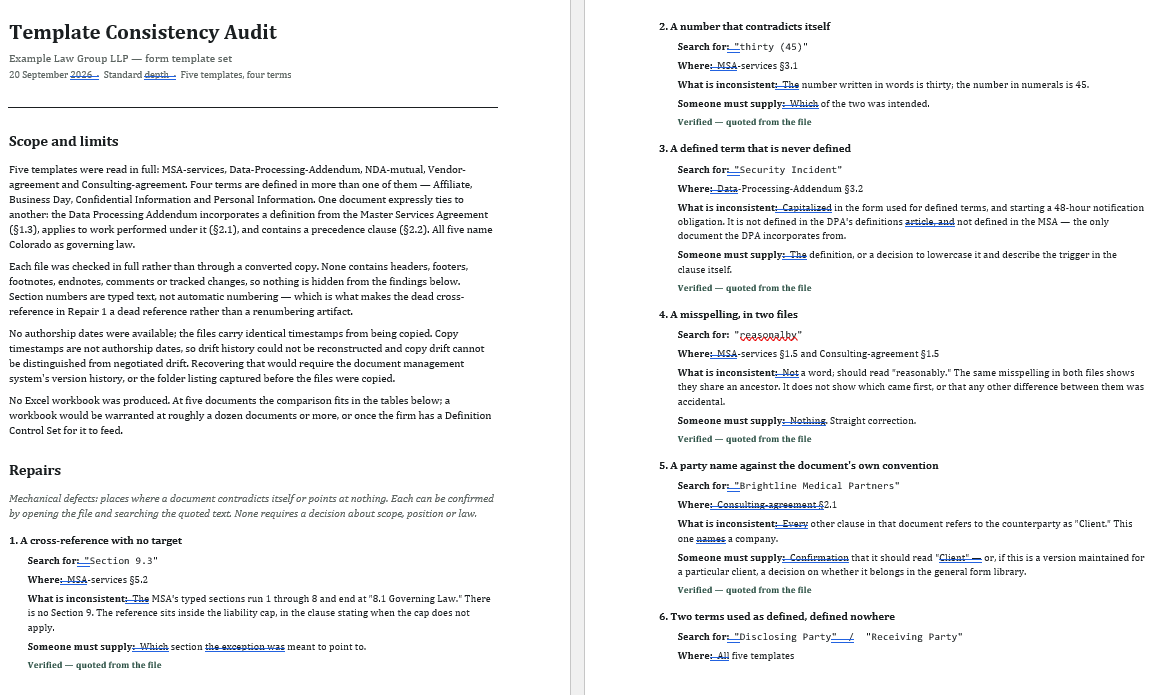
1st couple of pages
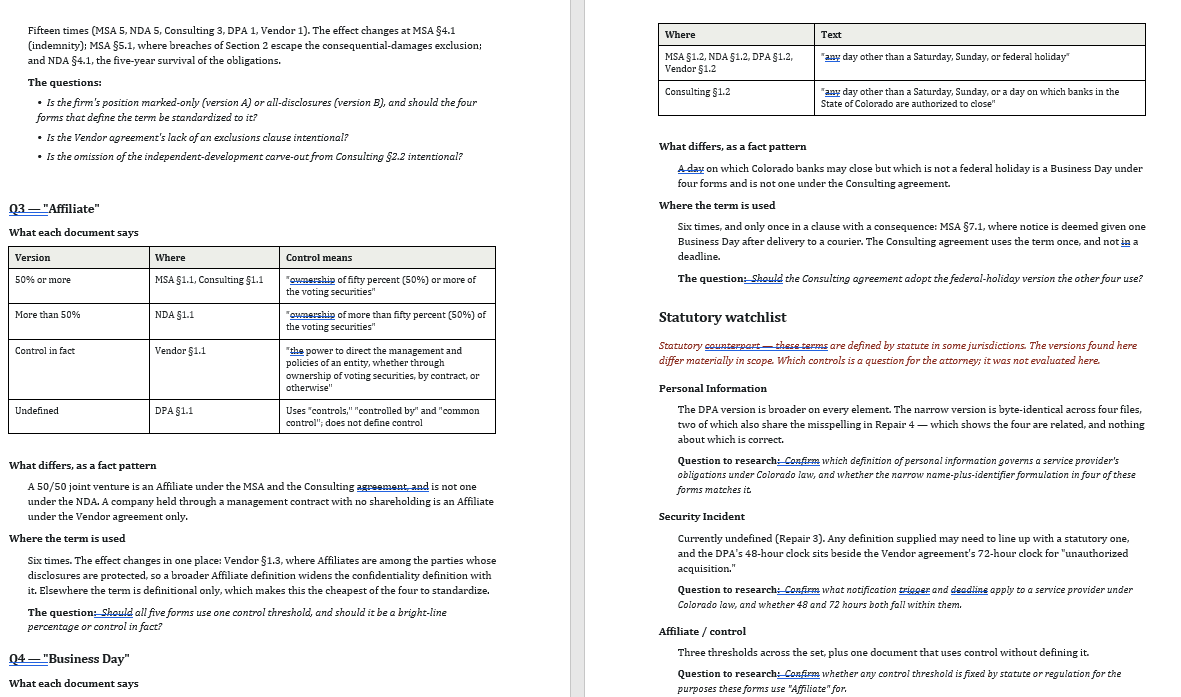
in depth comparisons
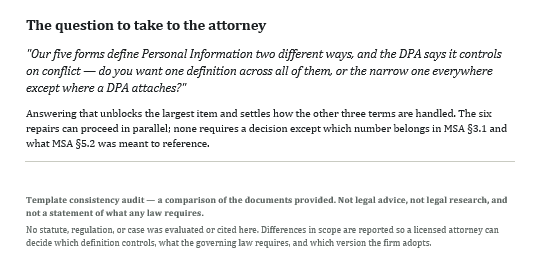
questions to take to the attorney
Sanitized example, not professional advice. All sales final — use the preview to confirm fit before purchase.
Compatible models
The author has tested this tool on the providers below. The specific model list updates automatically as providers ship new models or retire old ones. Compatibility with providers not listed below is not guaranteed — the tool may not produce equivalent results outside the tested set.
Data handling
Seller of record
- Business name
- Legal InnovAI LLC
- Entity type
- Verified business (Stripe-KYC'd)
- Location
- Colorado
This is the party you have a software-license contract with. If you aren't satisfied with the tool, please contact this party directly to work it out.
Legal InnovAI's founding principal has spent her career working a variety of roles within the legal industry: senior corporate paralegal at an AmLaw 10 firm, legal project manager and director of strategic operations at a couple of AmLaw 200 firms, executive director to a midsize boutique, and strategy consultant to dozens of midsize and large law firms. She has a master's degree in law firm management. Legal InnovAI is creator of CounselCommons and contributes automation tools to it.
Self-described — Counsel Commons™ does not verify professional credentials or background claims.
Version history
- v1.0.0Current2026-09-21
Existing buyers receive new versions free of charge. Pin to a specific version from your library if your workflow needs the exact bundle behavior of an earlier release.
Buyer reviews
No reviews yet — be the first after you buy.
- Tools are starting points, like templates. Read every file in the bundle before running, modify for your workflow, and assess safety and legal implications for your use case.
- Outputs vary run-to-run. Generative AI is non-deterministic by design — the same tool on the same input can produce different results, and outputs can vary across sessions, model versions, and provider load conditions. Your input will differ and your model may differ, so you should expect your output to vary from the example above. Variance is normal, not a defect.
- All sales final. Tools are immediately downloadable digital goods.