Partner Compensation System Simulator
ByLegal InnovAI LLCStrategy·Law Firm / Legal Business Management·Jurisdiction-neutral
About this tool
For defense, transactional, and hourly-billing law firms. NOT for plaintiff / contingency-fee firms. A decision-support and teaching tool for law firm leaders comparing how the same partnership and the same pool of distributable profit would be paid out under different partner-compensation system designs — the major well-known archetypes plus a variant for firms whose profit includes contingent / success-fee revenue. What you can do: - Build a partnership — generate a synthetic one from a size preset, or paste your own roster — and set the profit pool the simulator divides. - Compare several candidate compensation designs side by side, each tunable on its own dimensions. - See every partner's pay under each design, with summary measures of spread and concentration so the committee can read the distribution at a glance. - Model the transition from one design to another, including a phased roll-out with annual movement caps and an explicit flag on rainmaker flight risk. - Run a first-pass screen on each design for a raw gender pay gap (a screening signal, not a finding — defensible determinations belong with the separate Partner Pay Equity Analysis skill). - Draft per-partner committee adjustments under the chosen design and capture written rationales for each. - Project how the chosen design's distribution drifts as the partnership ages, holding the pool fixed. - Frame the qualitative trade-offs each design encodes — culture, retention risk, transparency, service-partner fairness, succession, pay-equity risk. - Export a committee briefing as a print-friendly PDF, a per-partner CSV, and a JSON scenario file you can re-load in a future session. Privacy posture: The simulator runs entirely in your browser after a single initial page fetch. Nothing you configure, type, or generate is sent anywhere — not to Counsel Commons, not to any third party. No cookies, no analytics, no telemetry. Counsel Commons logs only the initial page load itself (per-purchase identifier, IP, user-agent, timestamp) for forensic traceability — same posture as any skill bundle download. Scope and what this is NOT: - Built for hourly firms. The contingent-revenue variant covers hourly firms that also collect occasional success-fee work; it does not make this a plaintiffs-firm comp model. Plaintiffs / contingency-firm comp has its own economics — case-cost advances, referral-fee splits, fee-tier graduations, lien resolution, intake costs, mass-tort distribution tails — that this tool does not capture. A dedicated plaintiffs-firm partner-comp simulator is on the roadmap as a separate skill paired with the existing fake-plaintiffs-billing-data-generator. - Not a recommendation to adopt or move off any specific system. Outputs structure the comp committee's conversation; the committee decides. - Not a defensible pay-equity determination. The gender-gap screen flags raw differences for further investigation; controlled determinations (Oaxaca-Blinder decomposition, specification curve, quantile, panel) require the separate Partner Pay Equity Analysis skill. - Not a substitute for governance review, partnership-agreement amendments, or counsel on tax / employment / ERISA implications of a comp change. - Not predictive of any individual partner's behavior. Defaults are aggregates; real partners respond to incentives in ways no model captures fully. Runs entirely client-side after the initial page load. No LLM key, no install, no sign-in beyond your one-time purchase. Purchase once, use often. Outputs require professional review.
Preview before you buy:
Click your personalized URL → Step 1 Setup & roster: select the "AmLaw 100" preset (45 partners, $1.8M average draw, mixed origination patterns). Step 2 Comp systems: enable Lockstep, Modified Lockstep, and Eat-What-You-Kill presets. Step 3 Outcomes.
Outcomes table renders for all 45 partners across 3 systems. Median pay: Lockstep ≈ $1.78M (tight band $1.4M–$2.2M), Modified Lockstep ≈ $1.80M (band $1.1M–$2.7M), EWYK ≈ $1.66M (band $410K–$3.9M). Step 4 Transition flags 8 partners taking >$300K cuts moving Lockstep→EWYK. Step 5 Pay-equity screen flags 11% raw gender gap under EWYK vs 4% under Lockstep. Outputs require professional review.
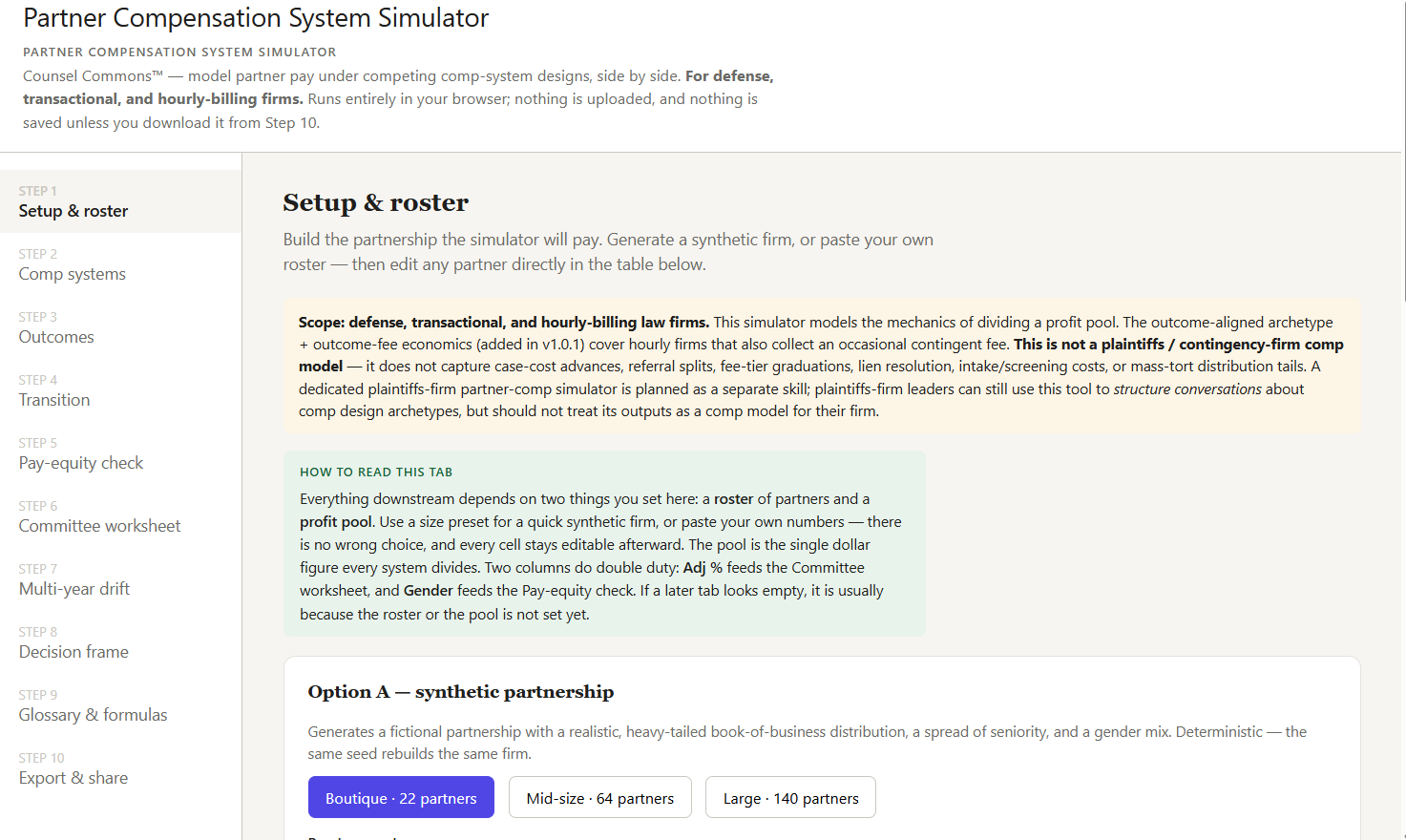
portion of first tab in simulator
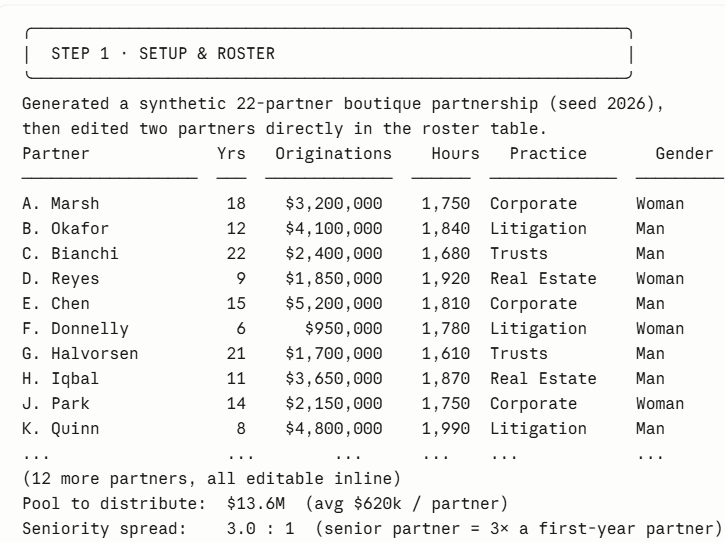
small sample of type of output (the actual simulator output is more visually appealing)
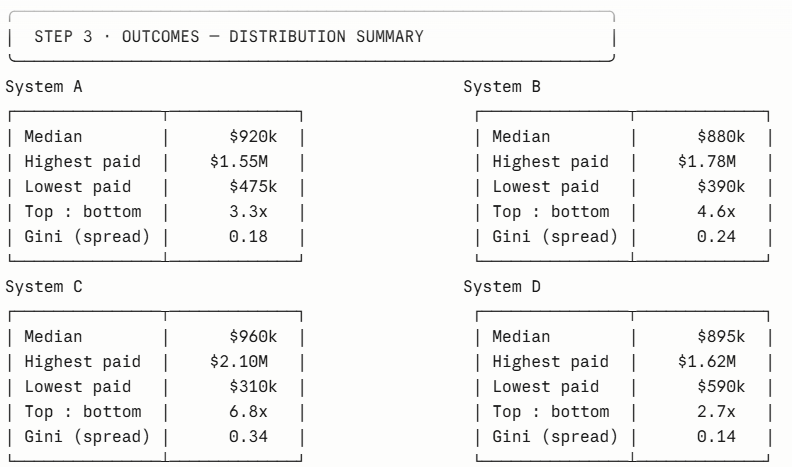
small sample of type of output (the actual simulator output is more visually appealing)
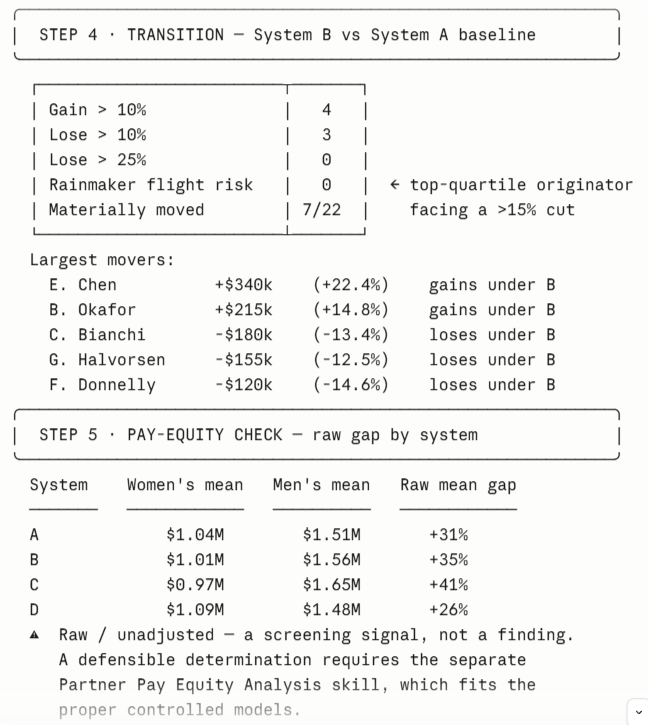
small sample of type of output (the actual simulator output is more visually appealing)
Sanitized example, not professional advice. All sales final — use the preview to confirm fit before purchase.
Compatible models
The author has tested this tool on the providers below. The specific model list updates automatically as providers ship new models or retire old ones. Compatibility with providers not listed below is not guaranteed — the tool may not produce equivalent results outside the tested set.
Data handling
Seller of record
- Business name
- Legal InnovAI LLC
- Entity type
- Verified business (Stripe-KYC'd)
- Location
- Colorado
This is the party you have a software-license contract with. If you aren't satisfied with the tool, please contact this party directly to work it out.
Version history
- v1.0.0Current2026-05-26
Existing buyers receive new versions free of charge. Pin to a specific version from your library if your workflow needs the exact bundle behavior of an earlier release.
Buyer reviews
No reviews yet — be the first after you buy.
- Tools are starting points, like templates. Read every file in the bundle before running, modify for your workflow, and assess safety and legal implications for your use case.
- Outputs vary run-to-run. Generative AI is non-deterministic by design — the same tool on the same input can produce different results, and outputs can vary across sessions, model versions, and provider load conditions. Your input will differ and your model may differ, so you should expect your output to vary from the example above. Variance is normal, not a defect.
- All sales final. Tools are immediately downloadable digital goods.