Transactional Pricing Analysis and Memo
ByLegal InnovAI LLCPricing & Profitability·Law Firm / Legal Business Management·Jurisdiction-neutral
About this tool
Use when pricing any prospective transactional matter with a defined closing event — M&A (buy- or sell-side), asset purchase, stock purchase, joint venture, corporate financing (credit facility, private placement, bond), or restructuring. The skill ingests your firm's closed comparable matters and a verbal scope description, then produces a forward-looking pricing memo plus a 7-sheet sensitivity workbook. What it produces. A pricing memo with comparable-matter analysis, expected hours/leverage/effective-rate baseline, four fee-structure options modeled at low/mid/high scope (hourly with budget, fixed fee, capped fee, blended rate), a separately-labeled post-quote realization sensitivity, a categorized risk register, and a recommendation broken into structure / number / engagement-letter conditions. The workbook carries the same analysis across 7 sheets with every figure tied to a visible formula and a Glossary sheet. Risk-register Likelihood and Magnitude columns are color-coded (Certain / High / Med / Low) for at-a-glance triage. Output format depends on your runtime. In agentic environments with file-creation tooling (e.g., Claude Code with the bundled docx + xlsx skills, or equivalent), you get a .docx memo plus a live-formula .xlsx workbook — every assumption cell is editable, every computed cell carries a real = formula plus a visible Formula: display string, and changing any blue input (annual rate increase, OCG concession, scope multiplier, Include flags on Sheet 6) makes every downstream figure recalculate. In chat-only environments (claude.ai, ChatGPT, Gemini), you get the same content as Word-ready markdown prose plus a readout of all 7 sheets as tables, every formula visible inline, AI calculation notice and disclaimers preserved. The skill declares which path it took as the first line of every response. Because showing formulas is so important to this skill, a values-only .xlsx — cells with hardcoded numbers and no formulas — is explicitly prohibited by the skill and will not be produced under any runtime; if the runtime cannot write live formulas, the markdown readout is delivered instead. Three input modes. Mode A — clean closed-matter export plus prospective scope (full analysis). Mode B — partial comparables plus verbal scope (directional output, wider sensitivity bands). Mode C — pure verbal walk-through (anchored to public benchmarks, framed as a discussion document, not a defensible pricing analysis). Where it fits best. Boutique transactional, mid-market, and AmLaw firms with structured timekeeper-level billing data (hours, billed, collected, standard rate, year), 3+ years of history for rate normalization, and the ability to filter to closed matters. Particularly suited to transactional-heavy practices (corporate, PE, finance) and firms that work under client OCGs. Not suited for litigation, arbitration, family law, IP prosecution, or any dispute-driven matter — the skill detects these and redirects. What it does not do. It does not make the pricing decision, negotiate with the client, predict the matter's actual outcome with precision, or assess the strategic value of a relationship. The recommendation is one input; the partner and pricing committee make the final call. Outputs require professional review before being shared with a client or used as the basis for an engagement letter — the skill carries an AI calculation notice, a data transmission notice, and a GIGO disclaimer at the top of every memo and on Sheet 1 of every workbook (or at the top of the markdown readout in chat-only runtimes), all of which must remain in place.
Preview before you buy:
A clean closed-matter export from your billing system covering 5+ matters comparable to the prospective transaction, plus the prospective matter's parameters.

Comparable export must include, per matter: client ID, matter ID, transaction type, status (must be closed), open/close dates, total hours, hours by timekeeper level, standard $, billed $, collected $, write-down amount and reason, fee structure (hourly / AFA), and at minimum a year field for rate normalization. A timekeeper roster with rates by year (standard and cost rates) lets the skill compute leverage and contribution margin; without it, those figures are flagged as estimates.

Prospective-matter description: client (existing or new), transaction sub-type (e.g. "buy-side acquisition of single private target, no regulatory approval"), explicit scope inclusions and exclusions, deal complexity signals (regulatory approvals, earn-outs, RWI, multi-jurisdiction, multi-party), expected timeline (sprint vs open-ended), expected staffing, fee-structure constraints, OCG terms in effect, and strategic context.

Mode B accepts partial comparables (a handful of matters with rough numbers); Mode C accepts a pure verbal walk-through with no data.
See screenshots for real output from synthetic (not real client) data. Results will vary — output quality depends on input quality.

Word memo — A single firm-internal document, ~6–10 pages, with front matter flagging that it was AI-generated and which data was sent through the model.

Sections:

Pricing preflight findings — How many comparable matters were available, how clean the data was, and which Outside Counsel Guideline constraints apply.

Comparable matter analysis — A table of the closest comparable matters and the headline numbers across them (typical hours, effective rates, leverage, realization, margin).

Prospective scope and assumptions — The hours estimate, who staffs it, and the rates used — with the reasoning behind each.

Fee structure options — Four pricing options (hourly with budget, fixed fee, capped fee, blended rate), each shown at a conservative, mid, and aggressive scope, with revenue, cost, and margin.

Post-quote realization sensitivity — What revenue and margin look like if write-downs land at various levels. Shown as context, not as a pricing input.

Risk register — The likely things that could move the number (scope creep, pacing, deal collapse, billing-guideline friction, write-downs, cap breach, slow pay).

Recommendation — The recommended structure and number, the conditions to put in the engagement letter, and a reminder that strategic value calls are still the partner's.

Excel workbook — 7 sheets, every number tied to a visible formula so you can audit or adjust anything:

Sheet 1 — Executive summary: the headline numbers and recommendation in one place.

Sheet 2 — Comparable pool: the comparable matters with medians, means, and percentiles across them.

Sheet 3 — Fee options: the four pricing options at three scopes. Editable input cells (in blue) for scope, rates, cushion, staffing mix, and cap multiple — change one and every option recalculates.

Sheet 4 — Realization sensitivity: revenue and margin under different write-down scenarios.

Sheet 5 — Risk register: each risk scored on likelihood and magnitude, color-coded for triage, with suggested mitigants.

Sheet 6 — Source data: the raw comparables with an Include? (Y/N) toggle on each row. Flip a row off and every aggregate, blended rate, and fee option updates instantly.

Sheet 7 — Glossary defining every term used.

Pricing — Your call. Workbook and memo serve as a starting point for discussion with pricing decision makers at your firm.
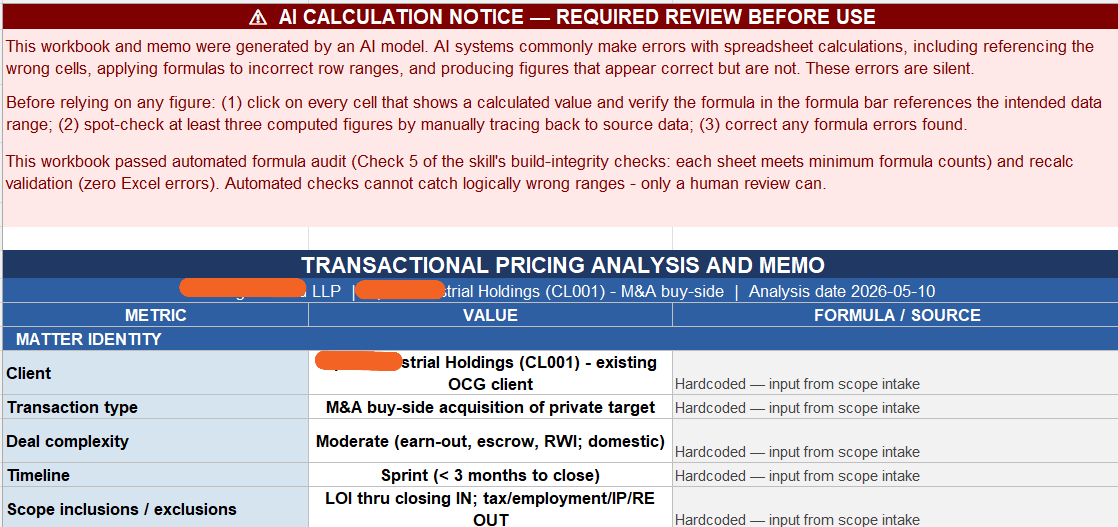
Part of Summary page
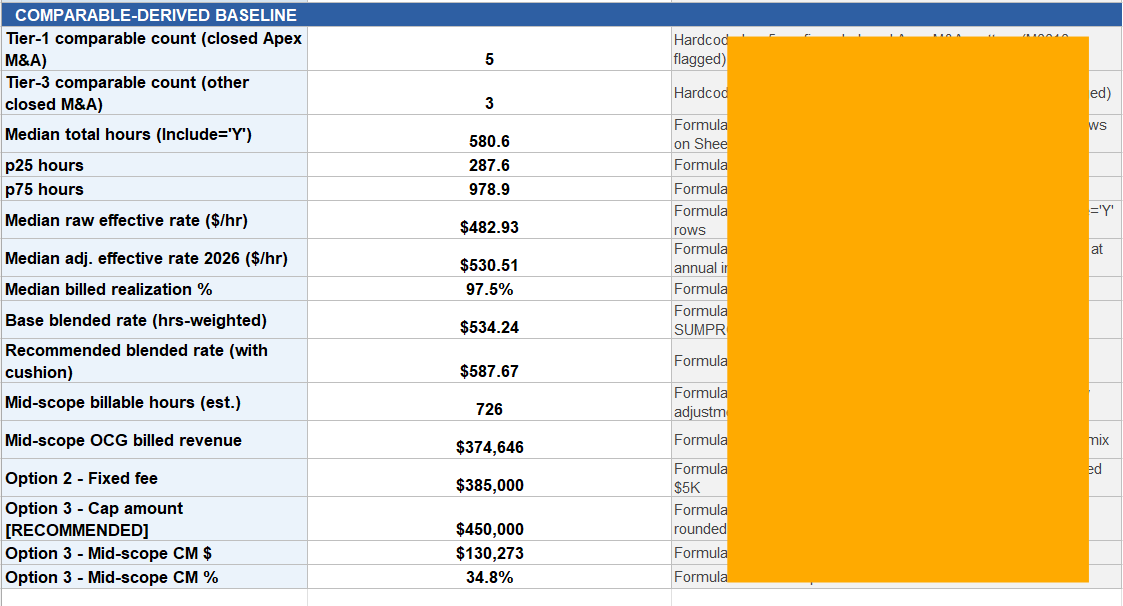
Part of Summary page
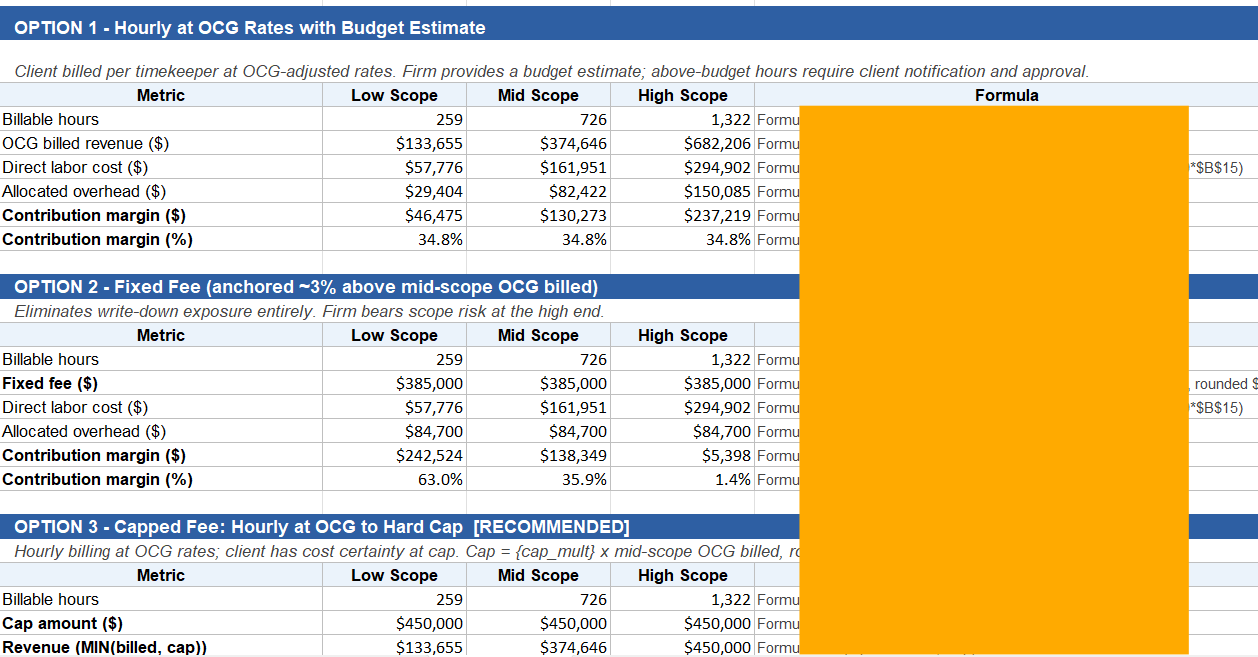
Part of Fee Options page
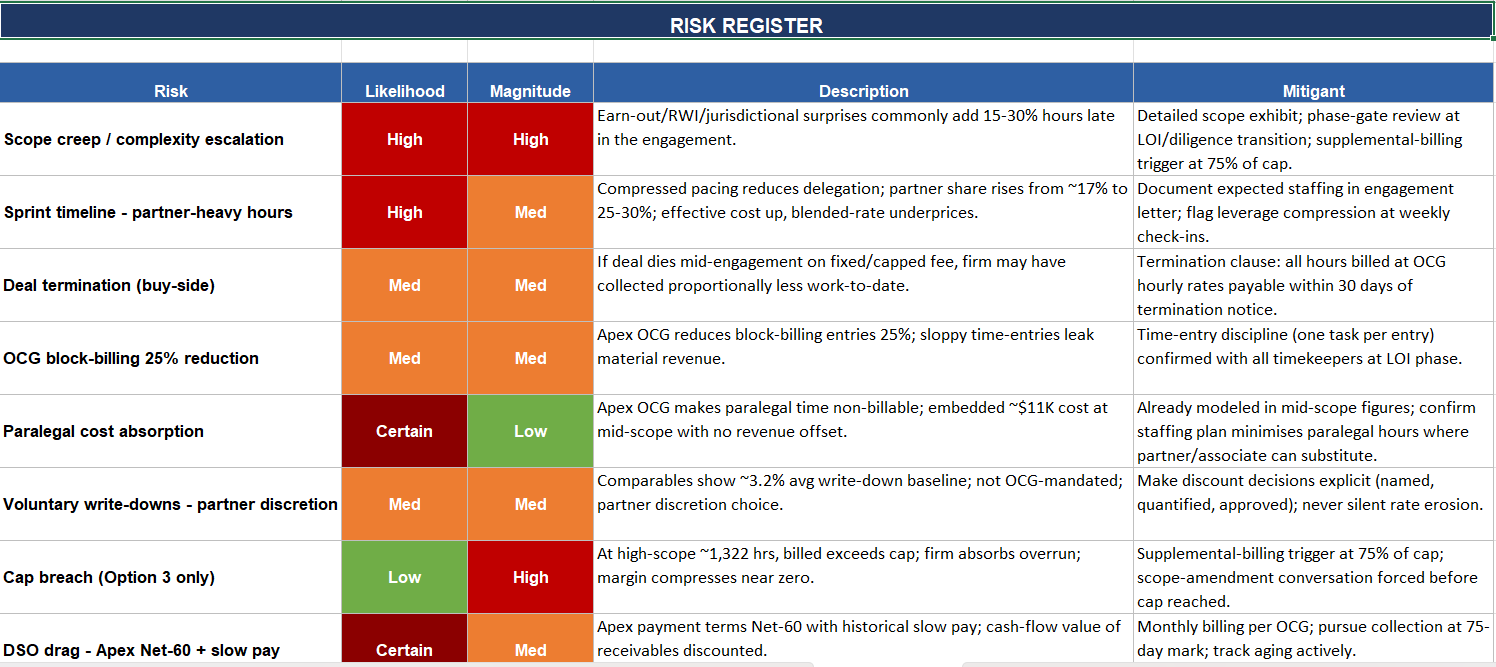
Part of Risk Register page
Sanitized example, not professional advice. All sales final — use the preview to confirm fit before purchase.
Compatible models
The author has tested this tool on the providers below. The specific model list updates automatically as providers ship new models or retire old ones. Compatibility with providers not listed below is not guaranteed — the tool may not produce equivalent results outside the tested set.
Data handling
Seller of record
- Business name
- Legal InnovAI LLC
- Entity type
- Verified business (Stripe-KYC'd)
- Location
- Colorado
This is the party you have a software-license contract with. If you aren't satisfied with the tool, please contact this party directly to work it out.
Version history
- v1.0.1Current2026-05-22
revised to fix page linking
- v1.0.02026-05-11
Existing buyers receive new versions free of charge. Pin to a specific version from your library if your workflow needs the exact bundle behavior of an earlier release.
Buyer reviews
- ★★★★★Colin L.Legal Operations·2026-08-15·Performed as described
This was absolutely fantastic both in terms of functionality as well as in terms of its robustness of analytical data.
- Tools are starting points, like templates. Read every file in the bundle before running, modify for your workflow, and assess safety and legal implications for your use case.
- Outputs vary run-to-run. Generative AI is non-deterministic by design — the same tool on the same input can produce different results, and outputs can vary across sessions, model versions, and provider load conditions. Your input will differ and your model may differ, so you should expect your output to vary from the example above. Variance is normal, not a defect.
- All sales final. Tools are immediately downloadable digital goods.